Preguntas frecuentes sobre la tarjeta de embarque móvil
¿Qué es una tarjeta de embarque móvil? Ver respuesta
Una tarjeta de embarque móvil es su tarjeta de embarque digital que contiene un código QR. Cuando pase los controles de seguridad y suba al avión, tendrá que utilizar este código. Puede consultar su tarjeta de embarque móvil a través de su correo electrónico, en la aplicación móvil de Turkish Airlines o en su sitio web.
¿En qué aeropuertos es válida la tarjeta de embarque móvil? Ver respuesta
La tarjeta de embarque móvil se puede utilizar en muchos aeropuertos. Le recomendamos que compruebe la compatibilidad del aeropuerto antes de su vuelo; puede encontrar la lista de aeropuertos actualizada más recientemente en
esta página.
¿Qué deben hacer los pasajeros si no disponen de conexión a Internet o si el wifi del aeropuerto no funciona? Ver respuesta
Le recomendamos que haga una captura de pantalla de su tarjeta de embarque móvil una vez creada, o que la guarde en una aplicación de monedero digital como Apple Wallet o Google Pay, por si acaso se cortara la conexión a Internet. De esta forma, podrá acceder fácilmente a su tarjeta de embarque incluso sin conexión.
¿Qué ocurre si un pasajero pierde el móvil o se le agota la batería? Ver respuesta
Si no puede acceder a su dispositivo, puede recoger su tarjeta de embarque física de forma gratuita en los mostradores de check-in o en las máquinas de autoservicio del aeropuerto con su documento de identidad o pasaporte.
¿Se puede utilizar una tarjeta de embarque móvil con un reloj inteligente? Ver respuesta
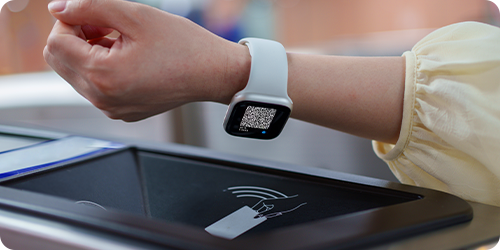
Puede descargar nuestra aplicación móvil en su teléfono y añadirla a su Apple Watch o Samsung Watch. Cuando genere su tarjeta de embarque móvil, el código QR aparecerá en su reloj. Al embarcar en su vuelo, puede escanear el código QR que aparece en la pantalla de su reloj inteligente.
¿Se pueden obtener tarjetas de embarque móviles para otros pasajeros que figuren en la misma referencia de reserva (PNR)? Ver respuesta
Sí, puede generar y consultar las tarjetas de embarque para móvil de todos los pasajeros de una misma referencia de reserva desde un único dispositivo. Al embarcar en el avión, basta con mostrar al personal, uno por uno, el código QR que aparece en la pantalla para cada pasajero.
¿Se pueden cambiar los números de asiento después de crear una tarjeta de embarque móvil? Ver respuesta
Sí, puede cambiar de asiento a través de la aplicación móvil o del sitio web. Sin embargo, es posible que su tarjeta de embarque actual deje de ser válida tras el cambio; por lo tanto, deberá generar una nueva tarjeta de embarque móvil en la que figure su número de asiento actualizado y eliminar la antigua.
¿Qué ocurre si no se puede escanear el código QR en el control de seguridad o en la puerta de embarque? Ver respuesta
Para garantizar que el código QR se escanee de forma eficaz y rápida, le recomendamos que ajuste el brillo de la pantalla al máximo cuando muestre su tarjeta de embarque móvil. En muchos dispositivos, el brillo de la pantalla aumenta automáticamente al abrir la tarjeta de embarque móvil. Si su pantalla tiene grietas o arañazos grandes, le recomendamos que imprima una copia en papel de su tarjeta de embarque antes de llegar al aeropuerto, por si no fuera posible escanear el código.
¿Cuándo es necesario tener una tarjeta de embarque impresa? Ver respuesta
Es posible que se exija una tarjeta de embarque física en determinados vuelos internacionales en los que se realicen controles de visado, o en determinados aeropuertos en los que las autoridades no acepten tarjetas de embarque digitales. Si el sistema no le permite generar una tarjeta de embarque móvil, puede obtener una tarjeta de embarque impresa en nuestros mostradores del aeropuerto.
¿Pueden los pasajeros con equipaje dirigirse directamente a la puerta de embarque con una tarjeta de embarque móvil? Ver respuesta
Si lleva equipaje además del equipaje de mano o de cabina, deberá facturarlo primero en los puntos de entrega de equipaje o en nuestros mostradores del aeropuerto. Una vez que haya completado este proceso, podrá pasar por el control de seguridad con su tarjeta de embarque móvil y dirigirse a la puerta de embarque.
¿Se puede utilizar una tarjeta de embarque móvil para los vuelos de conexión? Ver respuesta
Puede consultar sus tarjetas de embarque móviles para vuelos de conexión a través del sitio web o la aplicación móvil de Turkish Airlines. En algunos puntos de conexión, es posible que no se acepten las tarjetas de embarque digitales debido a los controles de visado o a la normativa del aeropuerto, por lo que quizá tenga que completar el proceso en un mostrador de check-in. En esos casos, el sistema le guiará; si no puede generar una tarjeta de embarque móvil, puede ponerse en contacto con nuestros mostradores de check-in en el aeropuerto.