Frequently asked questions about mobile boarding pass
What is a mobile boarding pass? View answer
A mobile boarding pass is your digital boarding pass containing a QR code. When you pass through security checks and board your flight, you’ll use this code. You can view your mobile boarding pass via your email or via the Turkish Airlines mobile app or website.
At which airports is the mobile boarding pass valid? View answer
The mobile boarding pass can be used at many airports. We suggest that you check airport compatibility before your flight; you can find the most recently updated list of airports on
this page.
How do passengers proceed if they lack an internet connection or if the Wi-Fi at the airport isn’t working? View answer
We recommend taking a screenshot of your mobile boarding pass after creating it, or saving it to a digital wallet app such as Apple Wallet or Google Pay, just in case your internet connection is lost. This way, you can easily access your boarding pass even when offline.
What happens if a passenger loses their phone or their phone battery runs out? View answer
If you are unable to access your device, you can collect your physical boarding pass free of charge at the check-in counters or self-service kiosks at the airport by presenting your ID card or passport.
Can a mobile boarding pass be used with a smartwatch? View answer
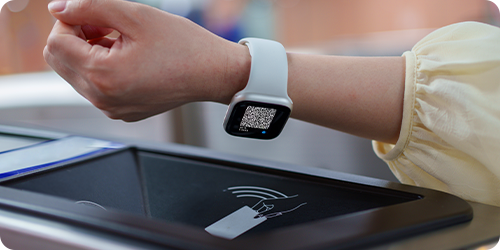
You can download our mobile app onto your phone and add it to your Apple Watch or Samsung Watch. When you create your mobile boarding pass, the QR code will appear on your watch. When boarding your flight, you can scan the QR code displayed on your smartwatch screen.
Can mobile boarding passes be obtained for other passengers on the same booking reference (PNR)? View answer
Yes, you can generate and view mobile boarding passes for all passengers on the same booking reference via a single device. When boarding the aircraft, simply show the QR code displayed on the screen for each passenger to the staff member in turn.
Can seat numbers be changed after creating a mobile boarding pass? View answer
Yes, you can change your seat via the mobile app or website. However, your current boarding pass may become invalid following the change; you will therefore need to create a new mobile boarding pass showing your updated seat number and delete the old boarding pass.
What if the QR code cannot be scanned at security or at the gate? View answer
To ensure the QR code is scanned effectively and quickly, we recommend setting your screen brightness as high as possible when presenting your mobile boarding pass. On many devices, the screen brightness increases automatically when the mobile boarding pass is opened. If your screen has cracks or deep scratches, it would be advisable to print out a physical copy of your boarding pass before arriving at the airport, in case the code cannot be scanned.
When is it necessary to have a printed boarding pass? View answer
A physical boarding pass may be required on certain international flights where visa checks are required, or at specific airports where the authorities do not accept digital boarding passes. If the system does not allow you to generate a mobile boarding pass, you can obtain a printed boarding pass by visiting our counters at the airport.
Can passengers with baggage proceed directly to the boarding gate with a mobile boarding pass? View answer
If you have any baggage other than your hand or cabin baggage, you must first check your bag at the baggage drop-off points or at our counters at the airport. Once you have completed this process, you can proceed through security with your mobile boarding pass and go to the boarding gate.
Can a mobile boarding pass be used for connecting flights? View answer
You can view your mobile boarding passes for connecting flights via the Turkish Airlines website or mobile app. At some transfer points, digital boarding passes may not be accepted due to visa checks or airport regulations, and you may need to complete the process at a check-in counter. In such cases, the system will guide you; if you are unable to generate a mobile boarding pass, you can contact our check-in counters at the airport.