Zum Hauptmenü

Fast, secure, and advantageous digital wallet: TKPAY Wallet

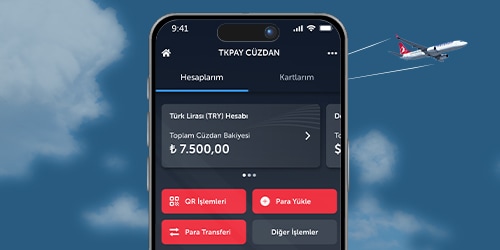
Turkish Airlines' new digital payment system, TKPAY Wallet, is your go-to for all your payments throughout your travels! With the TKPAY Wallet prepaid card, you can spend wherever you want, convert your Miles into cash, and make free money transfers 24/7. What's more, you can earn TK Money and cash back at many partner institutions when purchasing airline tickets.

Fast and easy transactions

You can add money to your TKPAY Wallet account via EFT/money transfer, debit/credit cards, or ATMs. You can spend using a QR code with your TKPAY Wallet prepaid card. You can also transfer money from your wallet account to your bank accounts 24/7, free of charge.

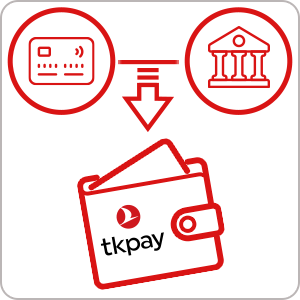
Easy money loading

You can load money into your TKPAY Wallet via EFT/money transfer, debit/credit cards, or ATMs. You can also easily receive your Turkish Airlines refund/compensation payments directly into your wallet account.

Converting Miles to Turkish Lira

By using TKPAY Wallet, you can instantly convert your Miles to Turkish Lira and spend them wherever you want with your TKPAY Wallet prepaid card.

Opportunity to earn TK Money and cash back!

With TKPAY Wallet, you can earn TK Money in your flight ticket payments, and use it to pay tickets and additional services and get cash back in your expenses with TKPAY Wallet prepaid card at many points.

Switching from TK Wallet to TKPAY Wallet


If you have a TK Wallet, you can click on the "TKPAY Wallet" menu in the Turkish Airlines mobile application to accept the agreements and step into the fast, easy, and advantageous world of TKPAY Wallet.

Creating a new TKPAY Wallet account


To create a new wallet account, click on the "TKPAY Wallet" menu in the Turkish Airlines mobile application and accept the agreements to start benefiting from TKPAY Wallet privileges.

You can benefit from special opportunities for members in many sectors, from transportation to food and beverage, from clothing to accommodation, in the world of advantages of TKPAY Wallet. You can visit the page to get information about the campaigns.

Frequently Asked Questions

General information

What is TKPAY? Learn more

Turkish Airlines Electronic Money and Payment Services Inc. is an electronic money and payment services institution authorized by the Central Bank of the Republic of Türkiye under Law No. 6493.

What is the TKPAY Wallet? Learn more

TKPAY Wallet is a digital wallet offered by Turkish Airlines for Miles&Smiles members.

Who can use the TKPAY Wallet? Learn more

All Miles&Smiles members can use the TKPAY Wallet.

Where can the TKPAY Wallet be used? Learn more

An unverified wallet can be used for tickets and additional services on the Turkish Airlines website and mobile app. After identity verification, it can be used for online purchases and QR code payments.

What is TK Money? Learn more

TK Money is gift money valid only on Turkish Airlines flights. It cannot be withdrawn as cash or refunded to the card.

Can the TKPAY Wallet Digital Card be used abroad? Learn more

TKPAY Digital Card can be used for online shopping abroad. QR code payments are supported only within Türkiye.

How is a TKPAY Digital Card created? Learn more

Digital card is automatically created once the account verification is completed. Up to three cards can be created.

After switching to the TKPAY Wallet, can balances in the current wallet be used? Learn more

Balances can be used for ticket and additional services payment for Turkish Airlines flights but cannot be refunded to the card. A refund can be made before switching.

Where to view cashback earnings? Learn more

All earned and pending cashback can be seen under “Account transactions > Pending transactions”.

How to I change notification settings? Learn more

Notification preferences can be updated under Profile > Help and Contact > TKPAY Notification preferences”.

Deposits and Withdrawals

What is a transferable and withdrawable balance? Learn more

Due to legal regulations, balances added with a credit card cannot be withdrawn as cash, but can be refunded to the card used for the deposit. Transactions made via bank transfer can be withdrawn as cash or transferred via wire/EFT.

How to top up the TKPAY Wallet? Learn more

Verified accounts support bank transfers, QR code at ATMs, or card top-ups. Unverified accounts allow only card top-ups.

How to top up money with bank transfer into the TKPAY Wallet? Learn more

When transferring money to the TKPAY IBAN address, the wallet owner's mobile phone number must be written in the description field as shown on the front. Otherwise, the money transfer will fail.

Which password is required for payments and money transfers? Learn more

The password created during the identity verification process must be used for payments and money transfers.

Account Security

What is a verified account and who can use it? Learn more

Members aged 18 and over can use features such as money transfers and QR code payments after completing identity and liveness verification.

How to update personal information in the TKPAY Wallet? Learn more

Personal information is automatically updated in TKPAY Wallet when it is updated under “My Profile > My Personal information” in the Miles&Smiles account.

How to close the TKPAY Wallet? Learn more

A wallet closure request can be submitted via Turkish Airlines feedback form.

What to do If an error occurs during TKPAY account opening? Learn more

Membership details should be checked and the process retried. If the issue persists, support can be requested via the feedback form with a screenshot.

How to dispute a card transaction? Learn more

A dispute request can be submitted under “Help and Contact > Spending dispute”.

How to enable or disable the TKPAY Digital Card for online shopping? Learn more

The card can be enabled or disabled for online shopping under “TKPAY Digital Card > Card settings.”

How to I change the TKPAY password? Learn more

The password can be changed under “Profile > Security settings > Change password”.

How to cancel the TKPAY Digital Card? Learn more

The card can be deactivated under “TKPAY Digital Card > Card settings.” For permanent cancellation, support can be requested via the feedback form.

Card Transactions

What is the TKPAY Digital Card? Learn more

TKPAY Digital Card is a prepaid card that allows payments via QR code through the mobile app without the need for a physical card.

Is the TKPAY Digital Card subject to a fee? Learn more

No, the TKPAY Digital Card is created free of charge.

Can purchases be paid in installments with the TKPAY Digital Card? Learn more

Currently, TKPAY Digital Card does not support installment payments.

Is QR code payment available abroad? Learn more

Currently, payments via QR code are supported only within Türkiye.

Please visit TKPAY Wallet terms and conditions page for TK Wallet terms and conditions.